# Microsoft Secure Boot Certificate Update
## Microsoft Secure Boot Certificate Expiration
Two crucial Microsoft Secure Boot certificates are set to expire in June 2026. They are:
\- Microsoft Corporation KEK CA 2011 (stored in KEK)
\- Microsoft UEFI CA 2011 (stored in DB)
In addition, another critical Microsoft Secure Boot certificate expires in October 2026.
\- Microsoft Windows Production PCA 2011 (stored in DB)
When these certificates expire, devices may fail to recognize trusted bootloaders, and future Secure Boot policies may not be applied. Updating the certificates ensures continued protection against malicious rootkits and ensures Windows firmware compliance
## Turn off temporary Bitlocker Encryption
Before applying this, ensure that your BitLocker recovery keys are backed up and accessible. Suspend BitLocker (Suspend-BitLocker) before the first reboot to prevent user lockouts.
I highly recommend including it when cloning machines, because when switching machines, people will have a different BitLocker key.
`Suspend-BitLocker -MountPoint "C:" -RebootCount 2``Get-BitLockerVolume -MountPoint "C:" | Select-Object ProtectionStatus`
## Updating Microsoft UEFI Certificates
### *Status*
To begin, administrators can check the status of the update process by reading the value of the **UEFICA2023Status** registry key.
`Get-ItemProperty -Path HKLM:\SYSTEM\CurrentControlSet\Control\SecureBoot\Servicing\ -Name UEFICA2023Status | Select-Object UEFICA2023Status`
[](http://doc-trevette.duckdns.org/uploads/images/gallery/2026-01/uujimage.png)
### *Update*
To initiate the update process, set the value of **AvailableUpdates** to **0x5944**.
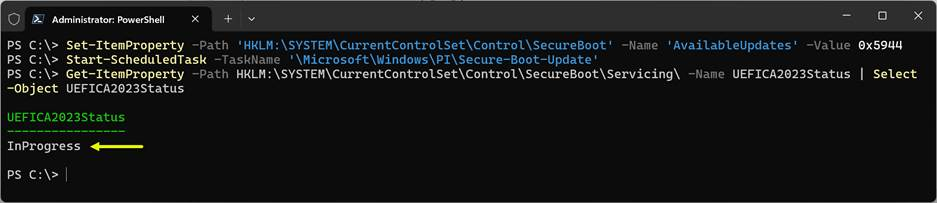
`Set-ItemProperty -Path ‘HKLM:\SYSTEM\CurrentControlSet\Control\SecureBoot’ -Name ‘AvailableUpdates’ -Value 0x5944`Next, start the **Secure-Boot-Update** scheduled task.`Start-ScheduledTask -TaskName ‘\Microsoft\Windows\PI\Secure-Boot-Update’`
Once complete, the **UEFICA2023Status** indicates **InProgress**.
Your computer can freeze for a few minutes.
[](http://doc-trevette.duckdns.org/uploads/images/gallery/2026-01/jv0image.png)
After a reboot, start the **Secure-Boot-Update** scheduled task once more. The **UEFICA2023Status** should indicate that it has been updated (may require one more reboot!).
it’s done.